 SDM Documentation
Common Features
Data Editing
Make corrections to users, classes, and courses before publishing
Data Editing
SDM allows you to make manual corrections to your imported data before publishing.
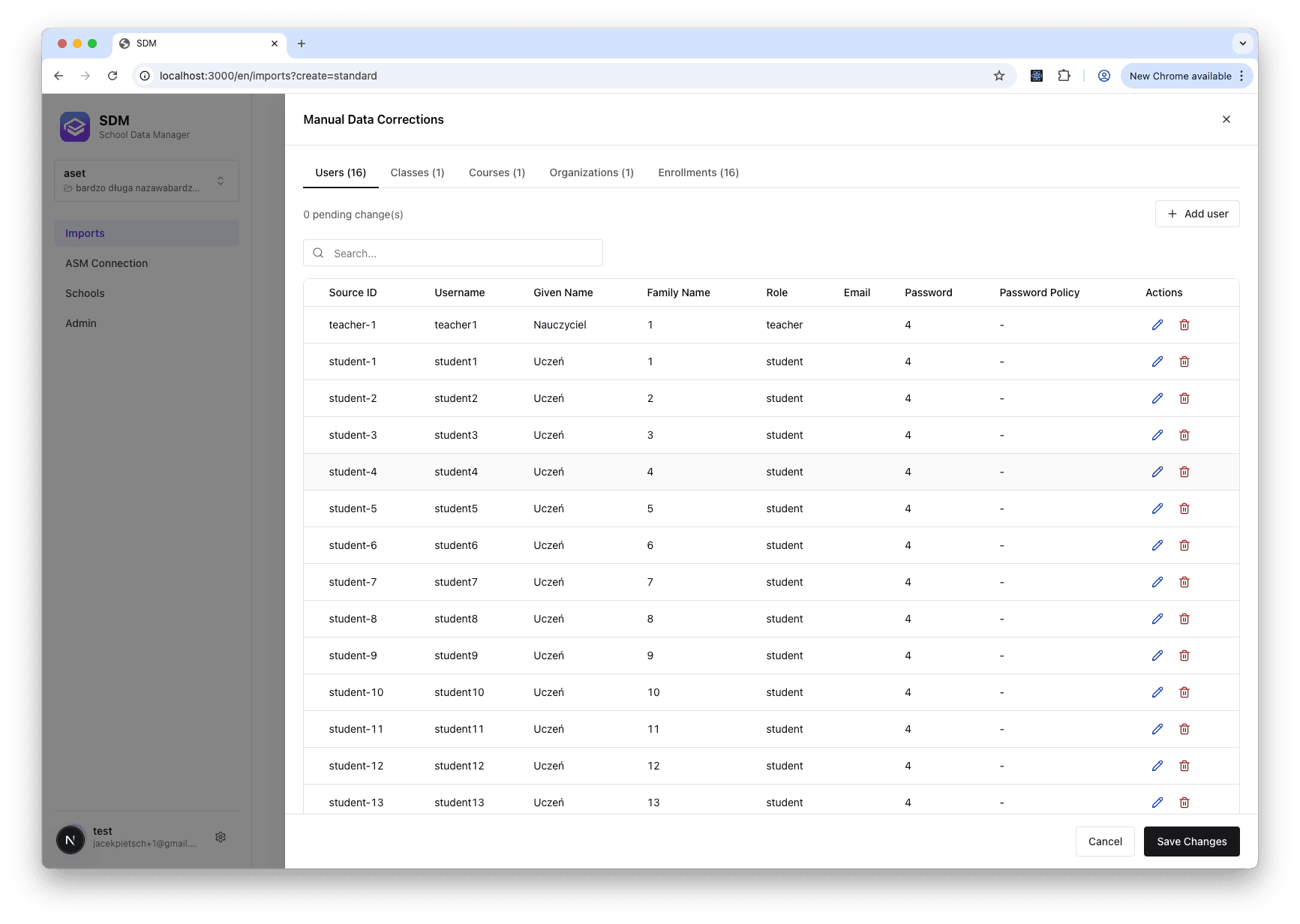
How Editing Works
When you edit data in SDM:
- Changes are stored as a changeset (list of modifications)
- Original source data remains unchanged
- Changesets are applied during preview and publishing
- You can edit, undo, or modify changes at any time
Editing Users
Click on any user row to open the edit modal:
- First Name / Last Name
- Email - Real-time validation for format
- Role - Student, Teacher, Administrator, Aide
- Grade - For students
- Password - For initial ASM passwords
Editing Classes
Click on any class row to edit:
- Title - Class display name
- Course - Select from imported courses
- Grades - Grade levels for this class
- Location - Physical or virtual location
Editing Courses
Click on any course row to edit:
- Title - Course display name
- Code - Course identifier
- Organization - Owning school/department
- Grades - Applicable grade levels
Viewing Your Changes
All modifications are tracked:
- Edited cells are highlighted
- Change summary shows counts (added/modified/deleted)
- You can review all changes before publishing