 SDM Documentation
Class Consolidation
Merge multiple classes into consolidated groups
Class Consolidation
Class consolidation solves a common problem: your SIS creates separate class sections (Math 1A, Math 1B, Math 1C) but you want them as a single class in Apple School Manager. This transform intelligently merges classes based on patterns you define, combining all students and teachers while respecting ASM's 15-instructor limit.
Overview
- Plugin ID:
transform-consolidation - Input: OneRoster data with multiple class sections
- Output: OneRoster data with consolidated classes
- Best For: Schools with multiple sections per subject
Why Consolidate Classes?
Common Scenarios
- SIS creates separate sections - Your SIS tracks "Math 1A", "Math 1B", "Math 1C" separately, but in ASM you want one "Math Grade 1" class
- Multiple teachers per subject - You want all teachers for a subject in one class
- Simplified class management - Fewer classes in ASM means easier administration
What Consolidation Does
- Combines multiple classes into one based on a grouping key
- Merges all student enrollments into the consolidated class
- Merges all teacher enrollments (with overflow handling for ASM's 15-instructor limit)
- Preserves all original data - consolidation is non-destructive
Extraction Method: Metadata JSON Path
Use this method when your SIS stores grouping information in class metadata fields.
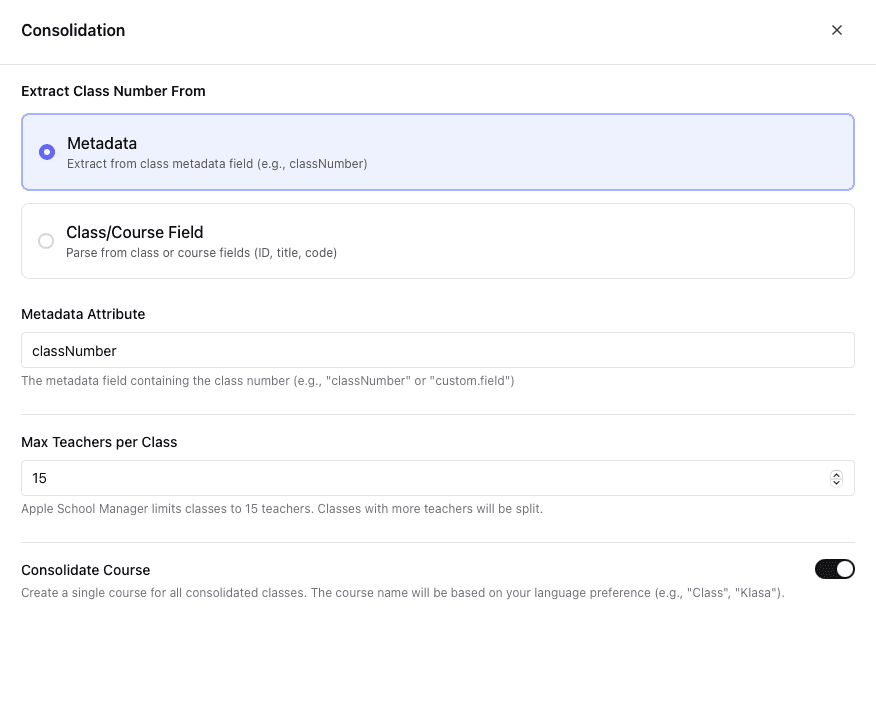
When to Use
- Your SIS exports a
metadatafield with consolidation keys - You have control over what metadata your SIS exports
- The grouping information isn't easily extractable from class names
Configuration
| Field | Description | Example |
|---|---|---|
| Metadata Field | Name of the metadata field | grades, customData |
| JSON Path | Path to the consolidation key | $.consolidation_key, $[0] |
Example: Metadata with Consolidation Key
Source Data (before consolidation):
| Class ID | Title | Metadata | Students | Teachers |
|---|---|---|---|---|
| c-001 | Math 1A | {"consolidation_key": "math-g1"} | 25 | 2 |
| c-002 | Math 1B | {"consolidation_key": "math-g1"} | 23 | 2 |
| c-003 | Math 1C | {"consolidation_key": "math-g1"} | 24 | 1 |
| c-004 | English 1A | {"consolidation_key": "eng-g1"} | 26 | 1 |
| c-005 | English 1B | {"consolidation_key": "eng-g1"} | 22 | 1 |
Configuration:
- Metadata Field:
metadata - JSON Path:
$.consolidation_key
Result (after consolidation):
| Class ID | Title | Students | Teachers |
|---|---|---|---|
| math-g1 | Math Grade 1 | 72 (combined) | 5 |
| eng-g1 | English Grade 1 | 48 (combined) | 2 |
All original enrollments are preserved and combined into the consolidated classes.
Extraction Method: Class/Course Name
Use this method when the grouping key can be extracted from class or course names using a regular expression.
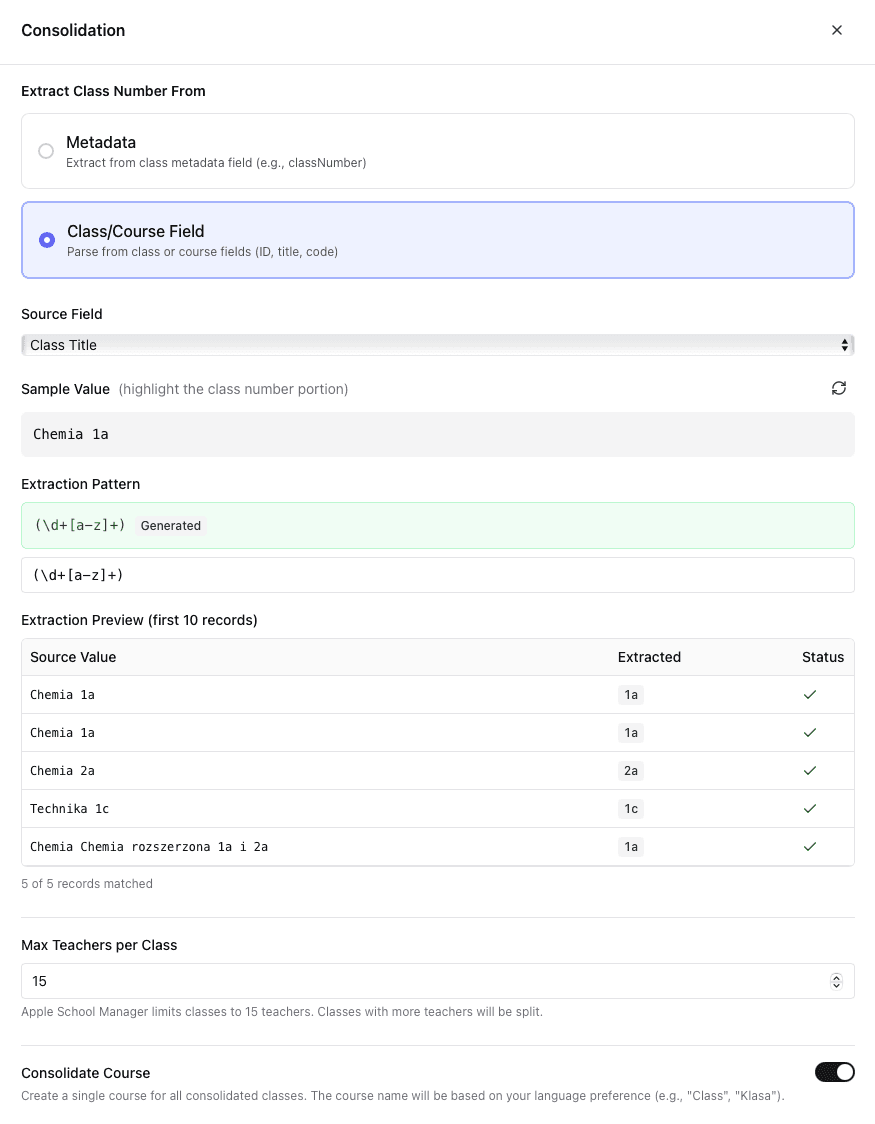
When to Use
- Class names follow a predictable pattern (e.g., "Math 1A", "Math 1B")
- You want to extract subject or grade from the name
- You don't have metadata fields available
Configuration
| Field | Description | Example |
|---|---|---|
| Source Field | Which field to extract from | title, courseTitle, code |
| Regex Pattern | Pattern with capture group | ^([A-Za-z]+)\s*\d, ^(.+)-\d+$ |
The regex must include a capture group (parentheses) to extract the consolidation key. The captured value becomes the grouping key.
Example: Extract Subject from Class Title
Source Data (before consolidation):
| Class ID | Title | Course | Students | Teachers |
|---|---|---|---|---|
| c-001 | Math 1A | Mathematics | 25 | 2 |
| c-002 | Math 1B | Mathematics | 23 | 2 |
| c-003 | Math 1C | Mathematics | 24 | 1 |
| c-004 | English 1A | English Language | 26 | 1 |
| c-005 | English 1B | English Language | 22 | 1 |
| c-006 | Science 2A | General Science | 20 | 2 |
| c-007 | Science 2B | General Science | 22 | 1 |
Configuration:
- Source Field:
title - Regex Pattern:
^([A-Za-z]+)\s*\d(captures letters before the first digit)
How the regex works:
^- Start of string([A-Za-z]+)- Capture group: one or more letters (the subject name)\s*- Optional whitespace\d- A digit (the grade/section number)
Extraction results:
| Original Title | Captured Key |
|---|---|
| Math 1A | Math |
| Math 1B | Math |
| English 1A | English |
| Science 2A | Science |
Result (after consolidation):
| Class ID | Title | Students | Teachers |
|---|---|---|---|
| Math | Math | 72 | 5 |
| English | English | 48 | 2 |
| Science | Science | 42 | 3 |
ASM Overflow Handling
Apple School Manager limits classes to 15 instructors. When a consolidated class has more than 15 teachers, SDM automatically creates overflow classes.
How Overflow Works
- Primary class created with first 15 instructors and all students
- Overflow classes created for remaining instructors: "Math-2", "Math-3"
- Students remain in the primary class only
- All instructors are distributed across overflow classes
Example: Overflow Handling
Before consolidation: 5 Math classes with 4 teachers each = 20 teachers total
After consolidation:
| Class | Instructors | Students |
|---|---|---|
| Math | 15 | 125 (all) |
| Math-2 | 5 | 0 |
Configuration Options
| Field | Description | Required |
|---|---|---|
| Method | metadata or field | Yes |
| Metadata Field | Field name for metadata method | If metadata |
| JSON Path | Path within metadata | If metadata |
| Source Field | title, courseTitle, or code | If field |
| Regex Pattern | Pattern with capture group | If field |
| Locale | Language for generated class names | No |
Best Practices
- Test with preview first - Always generate a preview to verify consolidation results before publishing
- Document your patterns - Note why specific regex patterns were chosen for future reference
- Verify instructor counts - Check that consolidated classes don't exceed 15 instructors (or overflow classes are created)
- Use specific patterns - More specific regex patterns reduce unintended matches
- Consider edge cases - What happens if a class name doesn't match your pattern?
Classes that don't match your consolidation pattern are passed through unchanged.